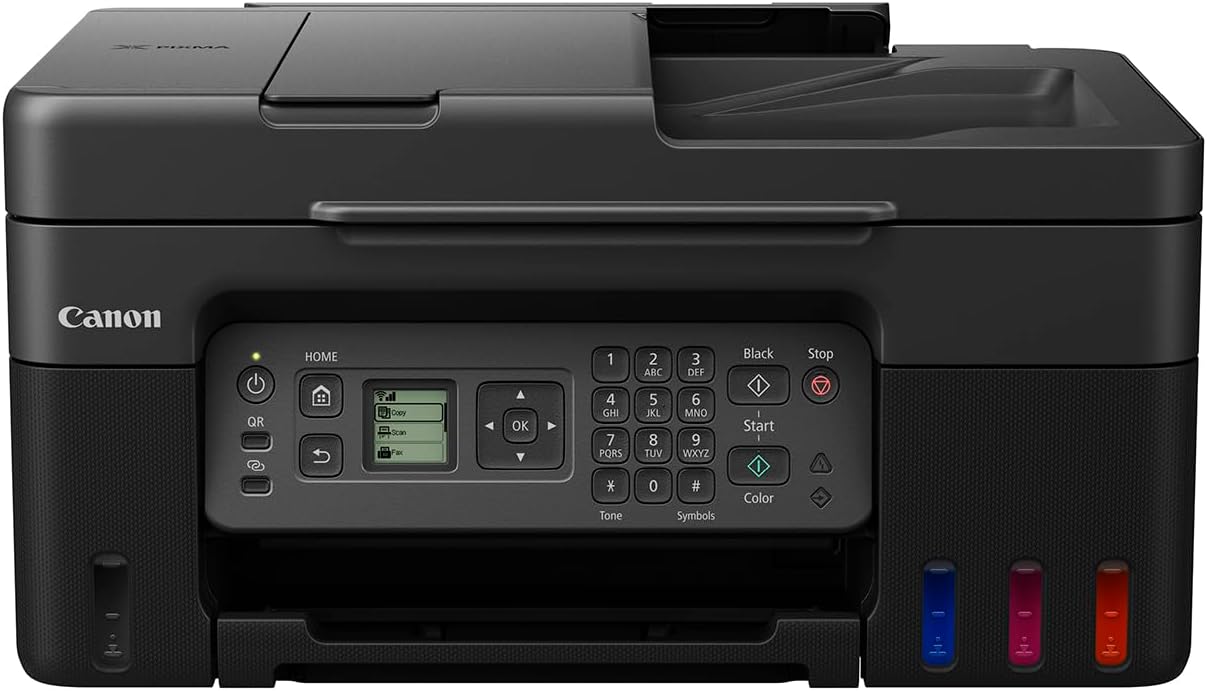
CANON Pixma G3470 G3470
"General Specifications Functions Wi-Fi, Print, Scan & Copy, Cloud Model Numbers Canon PIXMA G3470 Series Canon PIXMA G3470 Black Canon PIXMA G3470 White Canon PIXMA G3470 Red Printer Specifications Photo Print Speed Borderless 10x15cm : Approx. 45 seconds XXVII Print Technology 2 FINE Print Head (Black and Colour) Refillable ink tank printer Mono Print Speed approx. 11 ipm XXVIII Borderless Printing Yes A4, B5, LTR, 4"" x 6"", 5"" x 7"", 7"" x 10"", 8"" x 10"", Square (89 mm x 89 mm), Square(127 mm x 127 mm), Card Size(91 mm x 55 mm) XXIX Print Resolution Up to 4800 x 1200 dpi XXX Colour Print Speed approx. 6.0 ipm XXXI Two Sided Printing Manual operation Cartridges and Yields Standard Ink Cartridges GI-41 <PGBK> GI-41 <C> GI-41 <M> GI-41 <Y> Cartridge Yield (Plain Paper) A4 colour documents printing XXIII Black: 6,000 pages (Economy mode 7,600 pages) XXIV Colour: 7,700 pages (Economy mode 8,100 pages) XXV * Estimated supplemental yield Cartridge Yield (Photo) 10x15cm colour photo printing XXVI Colour: 2,200 photos * Estimated supplemental yield Consumables & Yields Maintenance Cartridge MC-G04 (User Replaceable) Paper Support Paper Weight Rear Tray: Plain paper: 64 - 105 g/m² Canon specialty paper: max paper weight : approx. 265 g/m2 (Photo Paper Plus Glossy II PP-201) Paper Types Plain Paper Red Label Superior 80 g/m2 (WOP111), Canon Oce Office Colour Paper 80 g/m2 (SAT213) Photo Paper Pro Luster (LU-101), Photo Paper Plus Glossy II (PP-201) Matte Photo Paper (MP-101), Glossy Photo Paper ""Everyday Use"" (GP-501) High Resolution Paper (HR-101N), Envelope, Photo Paper Plus Semi-gloss (SG-201), Greeting Card (manufactured by Avery and RedRiverPaper), Cardstock (manufactured by Neenah Paper and INKPRESS), Restickable Photo Paper(RP-101) Magnetic Photo Paper(MG-101) Dark Fabric Iron on Transfers (DF-101), Light Fabric Iron on Transfers (LF-101), Double sided Matte Paper (MP-101D) Maximum Paper Input Rear Tray: Max. 100 sheets (plain paper) Paper Sizes A4, A5, A6, B5, LTR, LGL, Executive (184.2 mm x 266.7 mm), Legal(215 mm x 345 mm), 4"" x 6"", 5"" x 7"", 7"" x 10"", 8"" x 10"", Envelopes DL, Envelopes COM10, Envelopes C5, Square (89 mm x 89 mm), Square (127 mm x 127 mm), Card Size(91 mm x 55 mm) [Custom size] width 55 mm - 216 mm, length 89 mm - 1200 mm Scanner Specifications Scanner Resolution (Optical) 600 x 1200 dpi XX Line Scanning Speed Colour: 3.5 ms/line(300dpi) XXI Greyscale: 1.5 ms/line(300dpi) XXII Maximum Document Size A4/LTR Scanning Depth (Input / Output) Colour: RGB each 16bit/8bit Greyscale: 16 bit / 8 bit Scanner Type CIS flatbed photo and document scanner Copier Specifications Copy Zoom 25 - 400% (in 1% increments) Fit to page A5 to A4, B5 to A4, A4 to A5 and A4 to B5 Copy Speed sFCOT: Approx. 23 sec XVIII sESAT: Approx. 3.2 ipm XIX Copy Quality 3 levels (Economy, Standard, High) Multiple Copy 99 copies (max.) Intensity Adjustment 9 positions, Auto intensity (AE copy) Copy Functions Document Copying, Photo Copying, Borderless copy, 2-on-1 and 4-on-1 copy, Frame erase copy, ID copy Interface Display Type & Size 1.35 "" / 3.4 cm Square LCD (Monochrome) Connectivity Smart Assistant & Automation Support Amazon Alexa™ V Google Assistant™ VI Mobile Apps Canon PRINT app VII Creative Park app VIII Easy-PhotoPrint Editor app IX Standard Interface Hi-Speed USB (USB B Port) Wi-Fi: IEEE802.11 b/g/n/ X Wi-Fi Security: WPA-PSK, WPA2-PSK, WEP, Administration password Wireless LAN Frequency Band: 2.4 GHz Wireless PictBridge XI Printer Features Easy-PhotoPrint Editor Software XII PIXMA Cloud Link (print) XIII Canon Print Service Plugin (Android) XIV Apple AirPrint XV Wireless Direct XVI Mopria (Android) XVII Software Minimum System Requirements Windows: 2.0GB or more Mac: 1.0GB or more Note: for bundled software installation. The necessary amount of hard disk space required. Display: 1024 x 768 XGA Software Included Printer Driver IJ Printer Assistant Tool Supported Operating Systems Windows 11, Windows 11 ARM, Windows 10, Windows 8.1, Windows 7 SP1 Operation can only be guaranteed on a PC with pre-installed Windows 7or later. Printer driver,IJ Printer Assistant Tool and IJ Network Device Setup Utility are available with following OS. Windows Server 2008 R2 SP1、Windows Server 2012 R2、Windows Server 2016、Windows Server 2019、Windows Server 2022 Mac: OS X 10.14.6 ~ macOS 12 Chrome OS Mobile Operating Systems: iOS®, Android™ IV Physical Features Power Source AC 100-240V, 50/60Hz Dimensions (W x D x H) Approx. 416 x 337 x 177 mm (with trays retracted) Approx. 416 x 557 x 268 mm (with trays extended) Power Consumption Off: Approx. 0.1W Standby (USB connection to PC): Approx. 0.6W Standby (all ports connected): Approx. 1.2W Time to enter Standby mode: 11minutes 0sec Copying: Approx. 16W I Typical Electricity Consumption 0.15 kWh II Recommended Operating Environment Operating Temperature: 5-35°C Operating Humidity: 10-90%RH (no dew condensation) Acoustic Noise Levels approx. 48.5dB(A) III Weight approx. 6.0 kg Page Footnotes Page Footnotes Disclaimers Standard disclaimers All specifications subject to change without notice. Print speed may vary depending on system configuration, interface, software, document complexity, print mode, page coverage, type of paper used etc. Ink yield may vary depending on texts/photos printed, applications software used, print mode and type of paper used. For yield information see www.canon-europe.com/ink/yield. All brand and product names are trademarks of their respective companies. Microsoft, Windows and the Windows logo are trademarks, or registered trademarks of Microsoft Corporation in the United States and/or other countries."
Specifications
- brand
- CANON
- model
- Pixma G3470
- Print Resolution
- Up to 4800 x 1200 dpi
- number
- 3470